Don't just own a 3D printer. Own 3D printing itself.
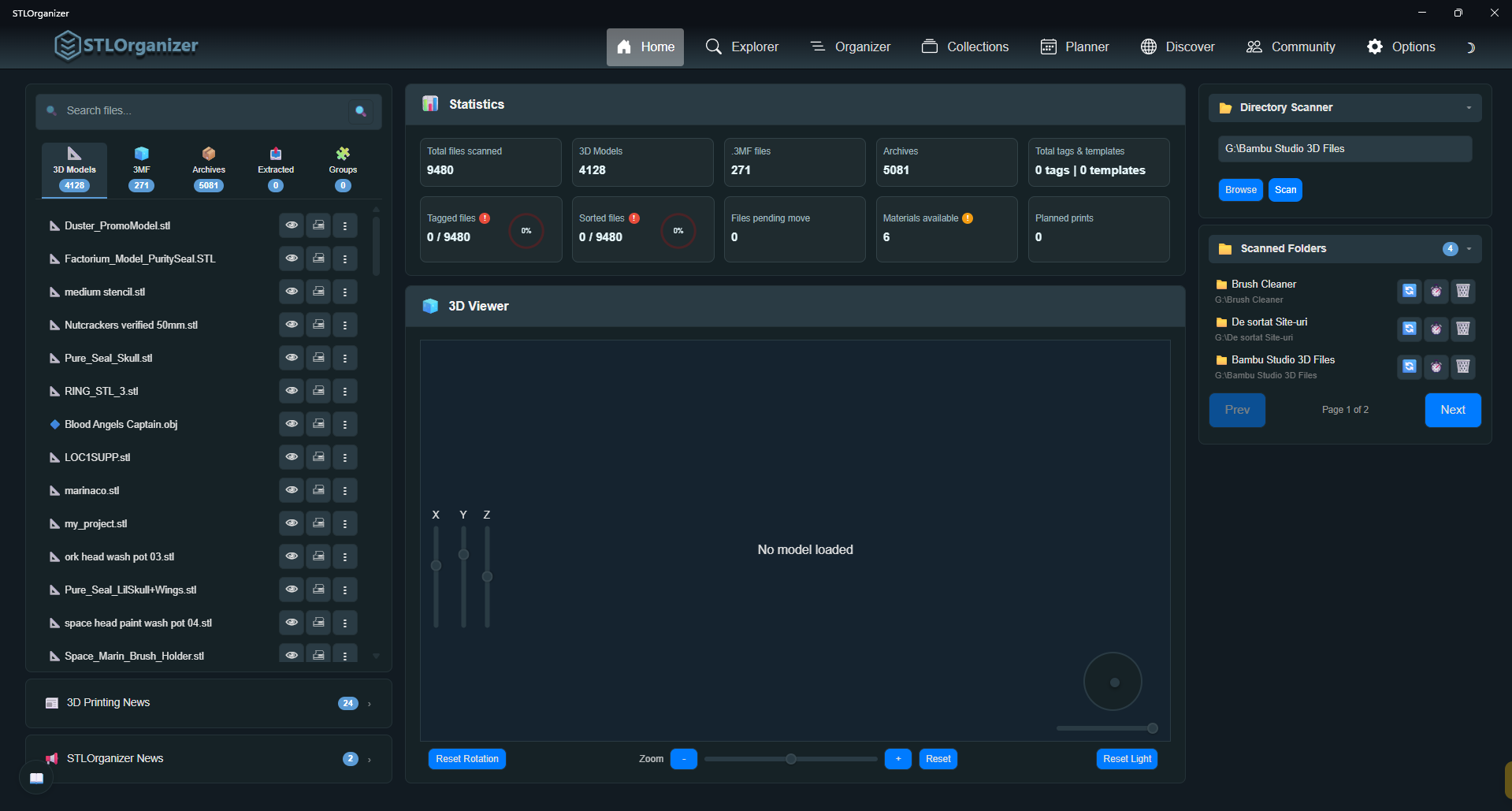
STLOrganizer turns chaotic STL folders into a real workshop — scan, preview, tag, and plan every print, all locally and without uploading a single file to the cloud.
STLVerse is a hub that brings together a growing suite of 3D-printing tools. Today it powers STLOrganizer's update system and manages the integrated Open Filament Database — so you always have the latest filament definitions at your fingertips.
Learn more about Open Filament DatabaseIf your STL library looks like this, you're not alone.
Most makers have thousands of files scattered across half a dozen download folders, USB drives, and old projects. Finding the right one is a treasure hunt — every time.
9,000 STLs, zero structure.
Duplicates everywhere. No previews. Tags? What tags. You re-download the same dragon three times because you can't find it.
├─ dragon_v2_FINAL.stl
├─ dragon_v2_FINAL_actual.stl
├─ dragon (1).stl
├─ untitled.3mf
├─ part-3-fixed.stl
├─ part-3-fixed-fixed.stl
├─ things/
├─ things-old/
└─ _archive_DO_NOT_DELETE/
One library. Tagged, previewed, ready to print.
Scan once. Every model gets a 3D preview, duplicate detection, and metadata you can search by tag, license, material, or note.
├─ ▲ household/ — 412 models
├─ ▲ tabletop/ — 1,204 models
├─ ▲ gifts/ — 88 models
├─ ▲ cosplay/ — 156 models
├─ ⌕ search by tag · license · author
└─ ⊘ 262 duplicates flagged
A workspace built for the way you actually print.
Seven core surfaces, each tuned to the part of your workflow it owns. No bloat, no AI gimmicks — just the tools you keep wishing your slicer had. Features marked Experimental are opt-in from Options.
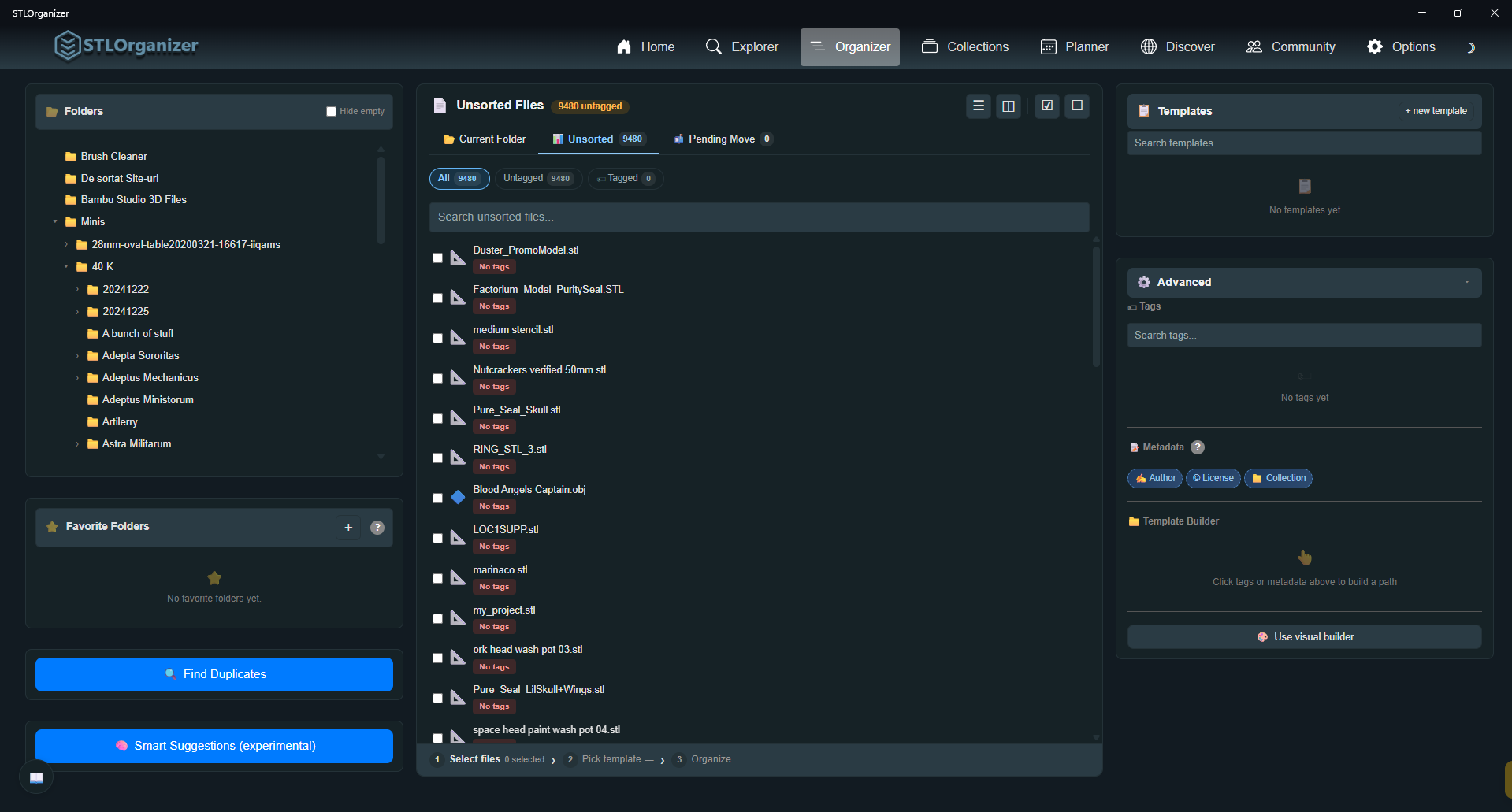
Tag, group, and move thousands of files in minutes.
Switch between Current Folder, Unsorted, and Pending Move tabs to triage your library. Build path templates from your own tags and apply them to hundreds of files at once. STLOrganizer plans the move and shows you exactly where every file will land before you commit.
- Multi-select with checkboxes — operate on hundreds of STLs at once
- Visual template builder for path structures you reuse
- Per-file metadata: author, license, collection, notes
- Built-in Find Duplicates across your entire library
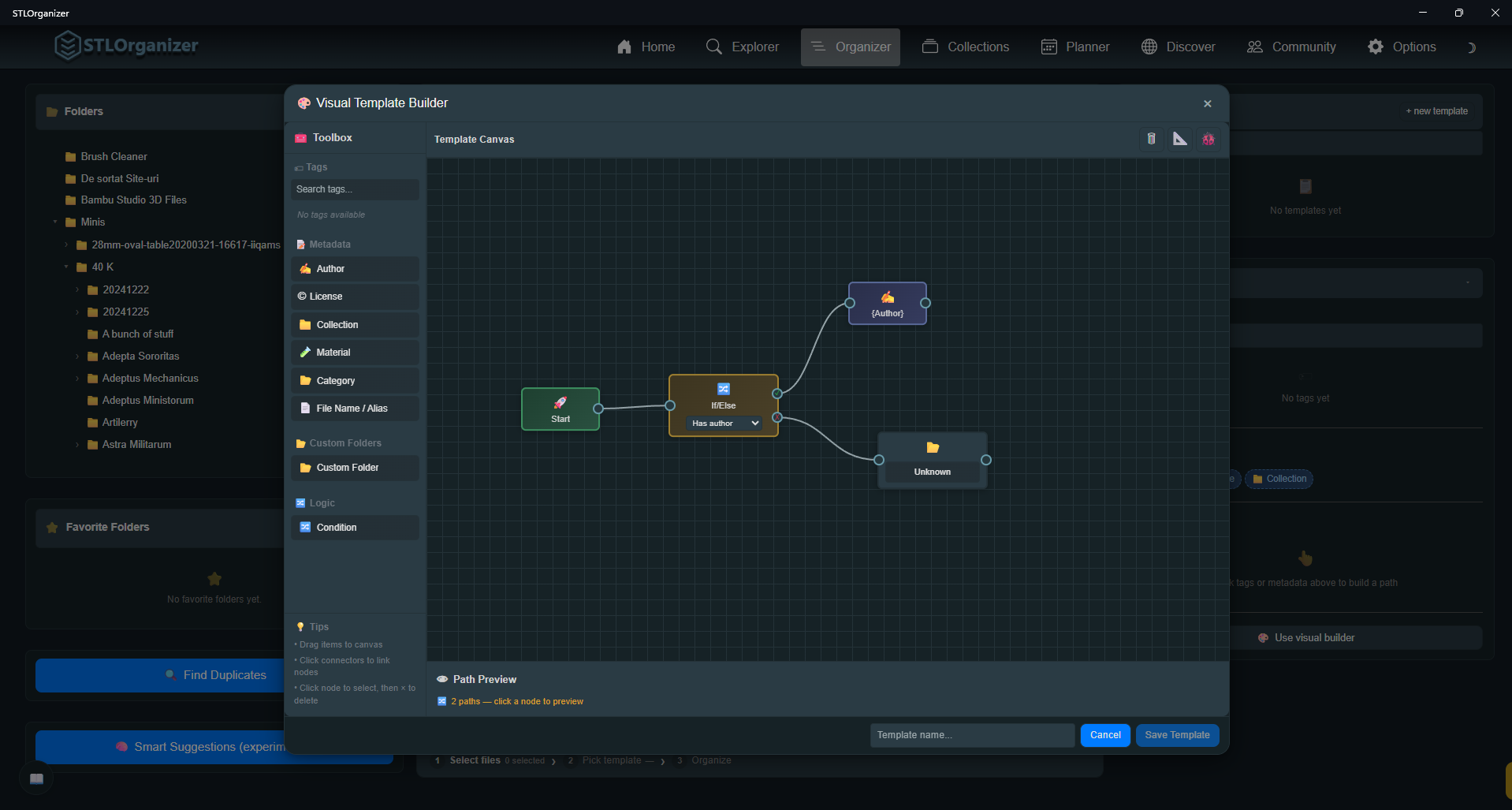
A node editor for folder structures — with logic.
Drag tags, metadata fields, and conditional logic onto a canvas to design exactly how your library should be laid out. Branch on author, license, material, or category with If/Else nodes — the kind of structure spreadsheets and rigid "smart folders" can't express.
- Drag-and-drop nodes: tags, metadata, custom folders, conditions
- If/Else branching on any metadata field — author, license, material
- Live path preview before you commit a single move
- Save templates and reuse them across folders & libraries
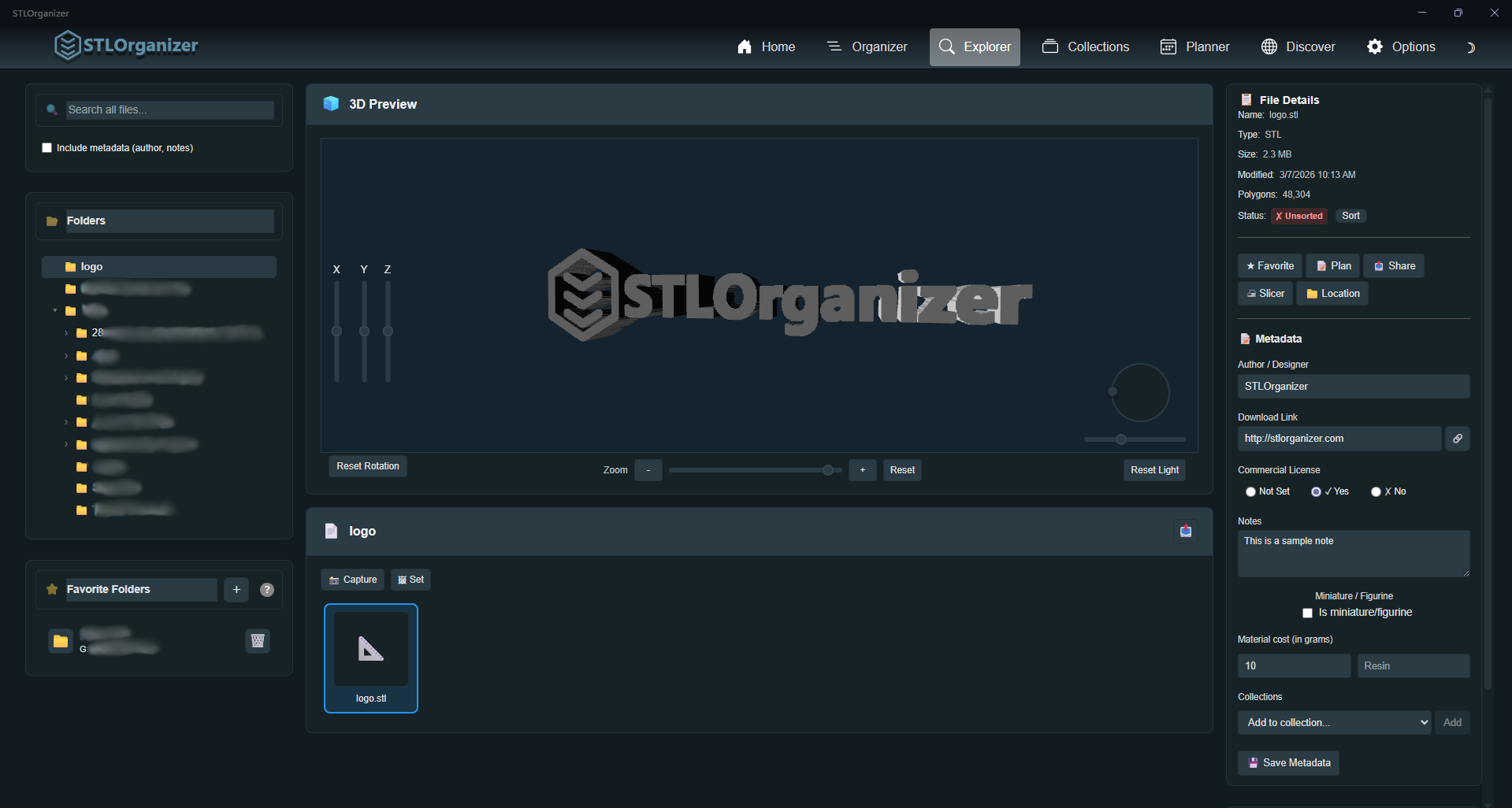
Preview any STL in 3D — no extra software.
Spin, zoom, and light up the model right inside the app. Capture a thumbnail to use as your file's cover, then fill in metadata the way you actually want: author, download link, license, material cost, miniature flag, notes.
- Hardware-accelerated 3D viewer that works offline — rotate, zoom, light, go fullscreen, capture a thumbnail. It only draws while the view is changing, so it stays light on your PC
- Pick a thumbnail from the images inside an archive or a 3MF file
- 3MF files fill in their own title, designer and license, and models downloaded from MakerWorld find their page link in one click
- Tag and fill in metadata for a whole folder at once
- Track commercial licensing per file — never get burned
- Flag models that aren't watertight and repair them Experimental
- Real dimensions, plus filament weight and cost estimates Experimental
- Note which colour you want each model printed in, picked from your filament stock with a check that enough is left, and record AMS slot colours for multi-colour prints, for your own reference Experimental
- A photo album for every file and archive — add your own photos, paste from the clipboard, capture the 3D view, or pull images out of the archive or 3MF, and use any of them as the thumbnail Experimental
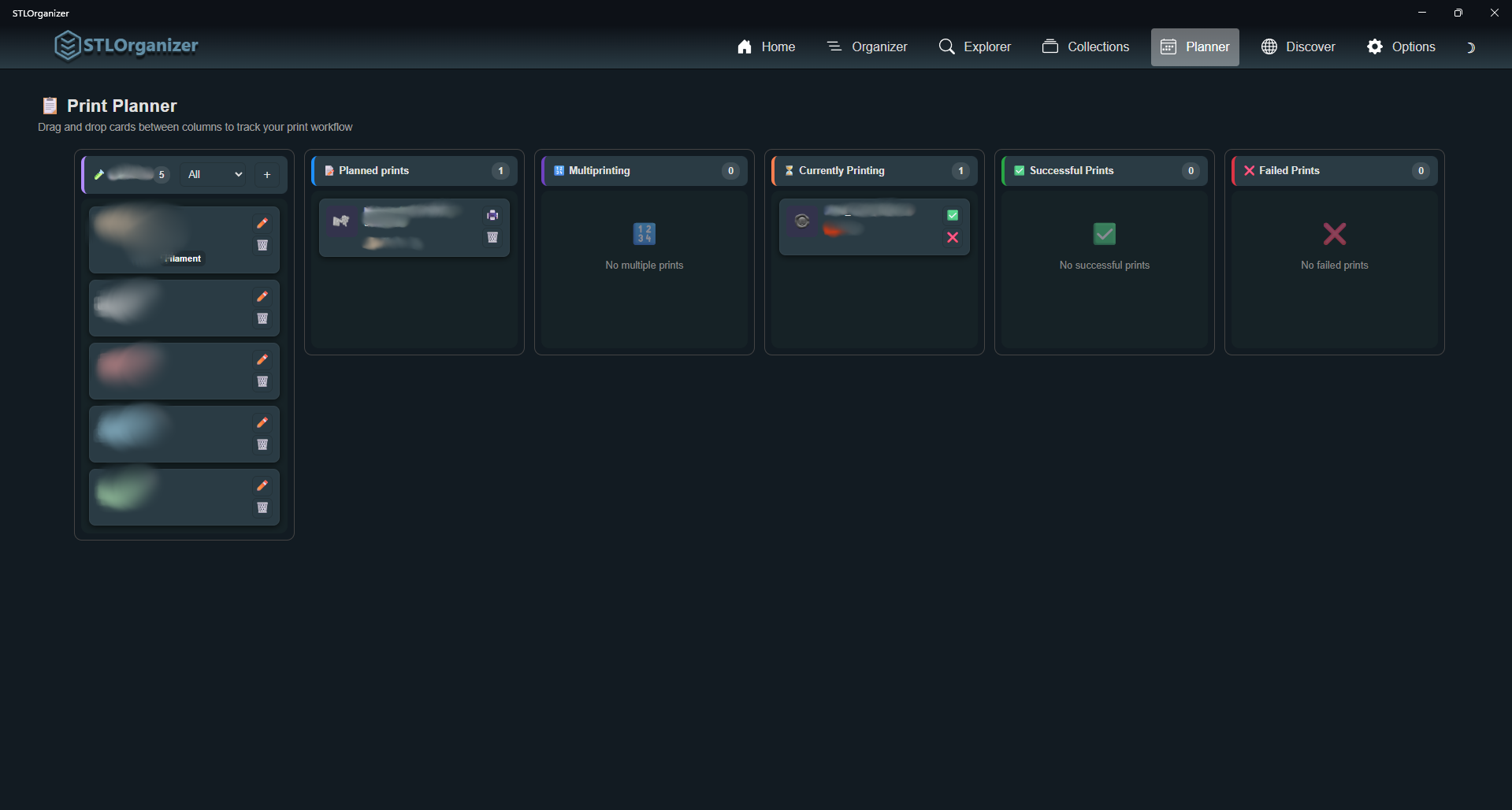
A kanban board for your print queue.
Drag prints across Planned, Multiprinting, Currently Printing, and Successful or Failed. Track filament use, batch by spool, and finally know what you printed last weekend.
- Drag-and-drop columns for every stage of the print
- Filament spools tracked with weight, color, and material
- Batch multi-prints onto a single plate, track them together
- Group planned prints into projects — an army, a figurine, kitchen utensils — each with its own thumbnail Experimental
- Connect Bambu Lab printers on your local network — finished prints move to Successful or Failed on their own
- Success / failure history per model and per spool
- Add a photo of a finished print — it goes straight into the model's album Experimental
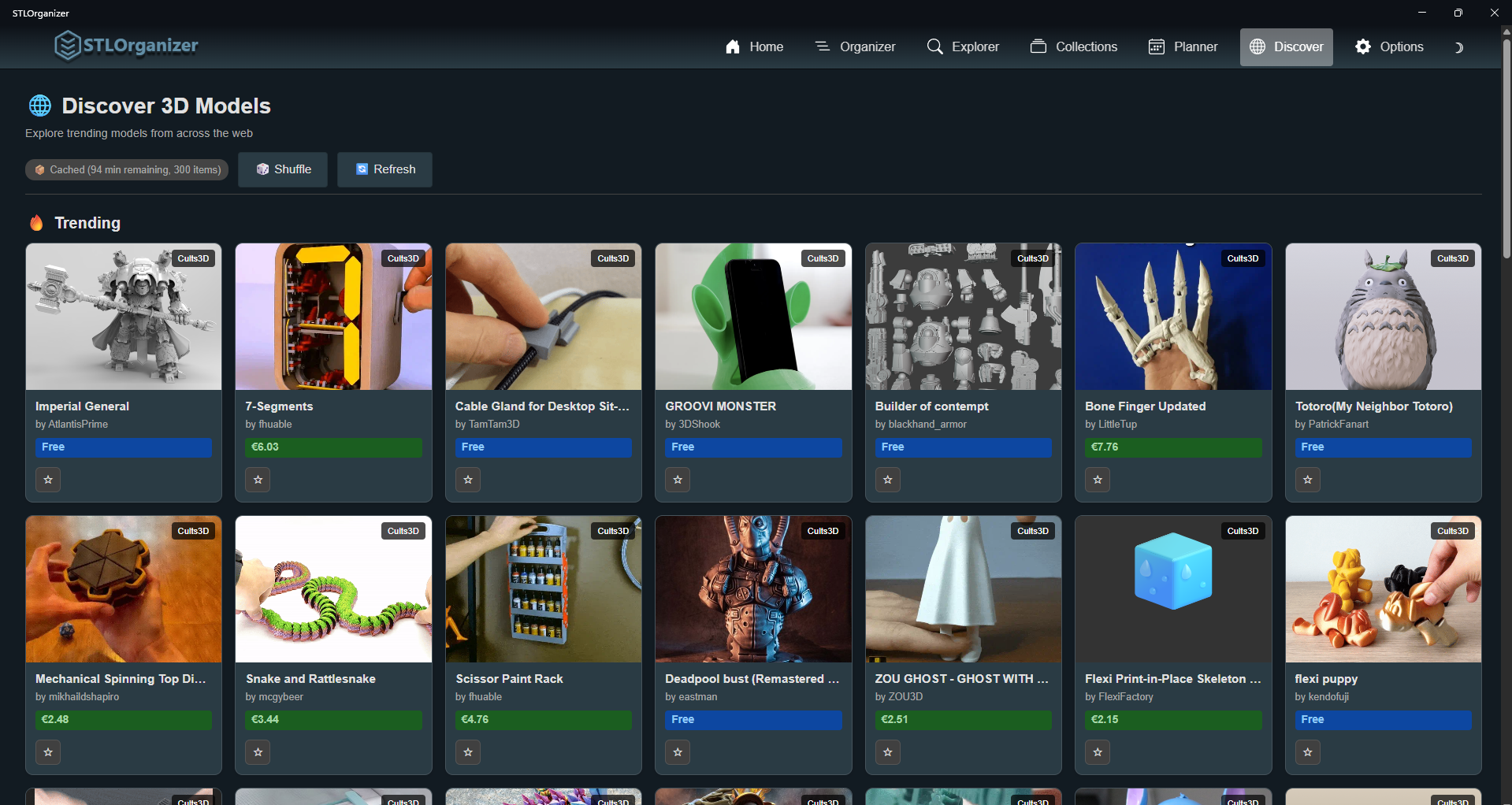
Find what to print next — without leaving the app.
Browse trending models from Cults3D right inside STLOrganizer. Get smart recommendations based on the tags you've already used, show only free or only paid models, and see at a glance which ones you already have.
- Trending, popular and newly added models from Cults3D, with author and price
- Personalized picks driven by your tag history
- Show all, free or paid models — your choice is remembered
- A “Downloaded” badge on models already in your library, or hide them altogether
- More sources rolling in — Printables & MakerWorld next
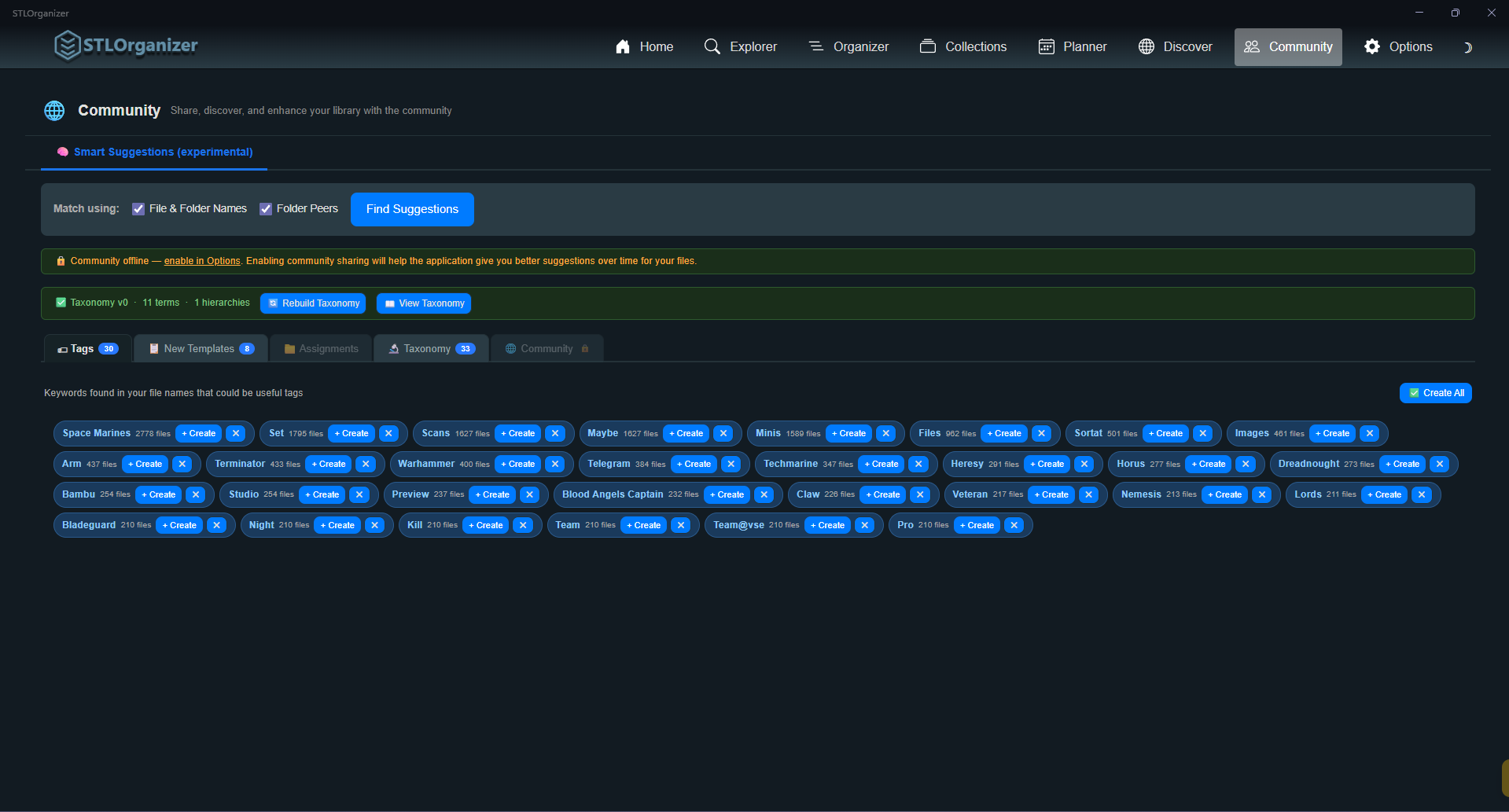
Smart tag suggestions — powered by the community, opt-in always.
Turn the Community feed on and STLOrganizer mines patterns from your file and folder names to suggest tags that have actually worked for other makers. Off by default. Every tag and template has a Private toggle. Your collections, files and metadata never leave your machine.
- Smart Suggestions mines your filenames for tags worth creating, and template suggestions show which files they came from
- A Taxonomy Map to inspect compound terms and remove the words you don't want linked to them Experimental
- Publish tags & path templates — or keep them private
- Collections, files & metadata stay 100% local — always
- Fully opt-in — Community is off by default, never required
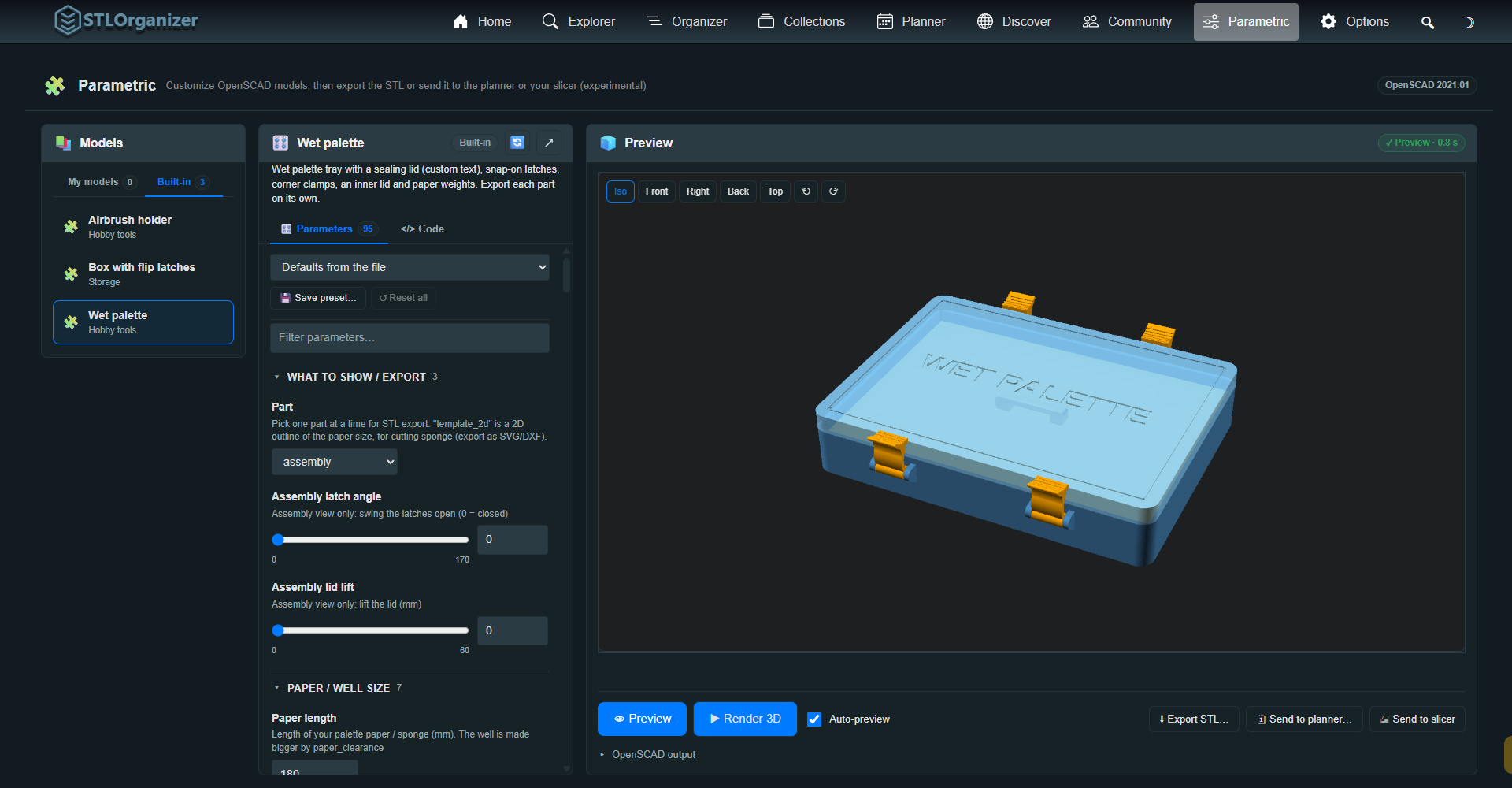
Customize a model instead of hunting for one.
Open an OpenSCAD model and STLOrganizer turns its parameters into a form — sliders, dropdowns, checkboxes. Start from the built-in models, add your own .scad files, or write a new one right in STLOrganizer. Change the values, and get a quick preview, usually in about a second. When it's right, export the STL or send it straight to the Planner or your slicer.
- A form built from the model's Customizer parameters, with presets you can save
- Built-in models to start from — your changes are saved as your own copy
- Write a new model from scratch in the built-in code editor and save it as a .scad file
- Quick preview from any angle, and a full 3D render when you need it
- Export the STL, or send it to the Planner or your slicer in one click
Needs OpenSCAD — free and open source, installed separately from openscad.org.
Built for makers who take their library seriously.
The details that turn a viewer into a workshop. Everything here is in the current Windows release.
STL · 3MF · OBJ · Archives
Scans nested folders and catalogues ZIP, RAR, and 7z archives, so the models inside are searchable without unzipping — and extracted for you when you preview them. ChiTuBox and Lychee files open too, and convert to STL or 3MF.
Search across everything
Filename, tag, metadata, notes, author. Search reaches inside archives too — including models the app hasn't extracted yet.
ExperimentalTag whole folders or give them a category, and press Ctrl+K on any page for Quick Find.
100% local-first
Your library, settings, and metadata live on your machine, and your files are never uploaded. No account, no cloud. The only usage data is an anonymous installation count — and you can turn it off.
Node-based template builder
Compose folder paths visually with a real node editor — drag tags, metadata, and If/Else conditions to design the structure your library will follow.
Find duplicates your way
Match by file name, size, polygon count, or any combination — across all your folders, archives included — then pick which copies to keep.
One-click to your slicer
Open any model directly in Bambu Studio, OrcaSlicer, PrusaSlicer, Cura, or ChiTuBox — they're detected automatically. Configure your default once and forget about it.
Collections
Gather models into collections with cover images, and preview them in 3D right from the collection — without moving a single file.
Whole drives & network storage
Scan a folder, an entire drive, or a NAS by pasting its network path. Rescans show what was added, removed, or changed since last time. Remove a file or folder and ignore it, and later scans skip it until you take it off the ignore list.
STLViewer & Windows integration
Right-click a folder in Windows File Explorer and choose “Scan with STLOrganizer” to add it to your library. STLViewer, the standalone viewer that comes with STLOrganizer, opens STL, 3MF, OBJ, and GLB files and can be your default 3D viewer in Windows. It tells you whether a model is already in your library, and if it isn't, it can add it there directly. Set both up in Options → General → Windows integration.
Built by a guy who got tired of guessing.
"I'd download a model on a Tuesday and spend forty minutes Wednesday night trying to find it again. STLOrganizer is the tool I needed for myself — local, fast, and honest about what it does. If you've ever lost a print to a folder named things-old/, this is for you."George-Adrian Balas — Maker, developer & creator of STLOrganizer
Shipped, shipping, and what's next.
We ship the Windows core first, then expand sources and platforms. The list below is the actual plan — not aspirational fluff.
Core organizer
Folder, drive, and network scanning, archive cataloguing, 3D preview, tag templates, find duplicates, bulk metadata, collections, planner board, the standalone STLViewer — plus parametric models and photo albums, in experimental form.
Windows public release
Free Windows installer with every core feature — scan, preview, tag, plan, and discover, all in one place.
We are hereFull release of STLOrganizer
STLOrganizer leaves beta, polished and ready for everyday use.
The next STLVerse module is already in the works. More soon.
More modules for STLVerse
Expanded modules for STLVerse will be coming in the future with inter-app communications through the STLVerse hub application.
Other platforms
macOS and Linux are on our minds but not yet promised — we'll only announce a build when we're confident we can ship it well.
Questions makers actually ask.
Is STLOrganizer free?
Does my data ever leave my computer?
What file types are supported?
Will it work with my slicer?
What are experimental features?
Do I need anything else for parametric models?
What about Mac or Linux?
What's the "Smart Suggestions" thing about?
Do I have to share anything with the Community?
Can I move folders around outside the app?
How do I report a bug, ask a question, or suggest a feature?
STLOrganizer for Windows is out now — take back your library.
Free to download, free to use. Turn that folder chaos into an organized, searchable workshop today.
Download for WindowsGet release notes and major updates by email. No spam, ever — unsubscribe in one click.
Join the community.
Follow us for updates, sneak peeks, and to share your prints with fellow makers.