Don't just own a 3D printer. Own 3D printing itself.
STLOrganizer turns chaotic STL folders into a real workshop — scan, preview, tag, and plan every print, all locally and without uploading a single file to the cloud.
STLVerse is a hub that brings together a growing suite of 3D-printing tools. Today it powers STLOrganizer's update system and manages the integrated Open Filament Database — so you always have the latest filament definitions at your fingertips.
Learn more about Open Filament DatabaseIf your STL library looks like this, you're not alone.
Most makers have thousands of files scattered across half a dozen download folders, USB drives, and old projects. Finding the right one is a treasure hunt — every time.
9,000 STLs, zero structure.
Duplicates everywhere. No previews. Tags? What tags. You re-download the same dragon three times because you can't find it.
├─ dragon_v2_FINAL.stl
├─ dragon_v2_FINAL_actual.stl
├─ dragon (1).stl
├─ untitled.3mf
├─ part-3-fixed.stl
├─ part-3-fixed-fixed.stl
├─ things/
├─ things-old/
└─ _archive_DO_NOT_DELETE/
One library. Tagged, previewed, ready to print.
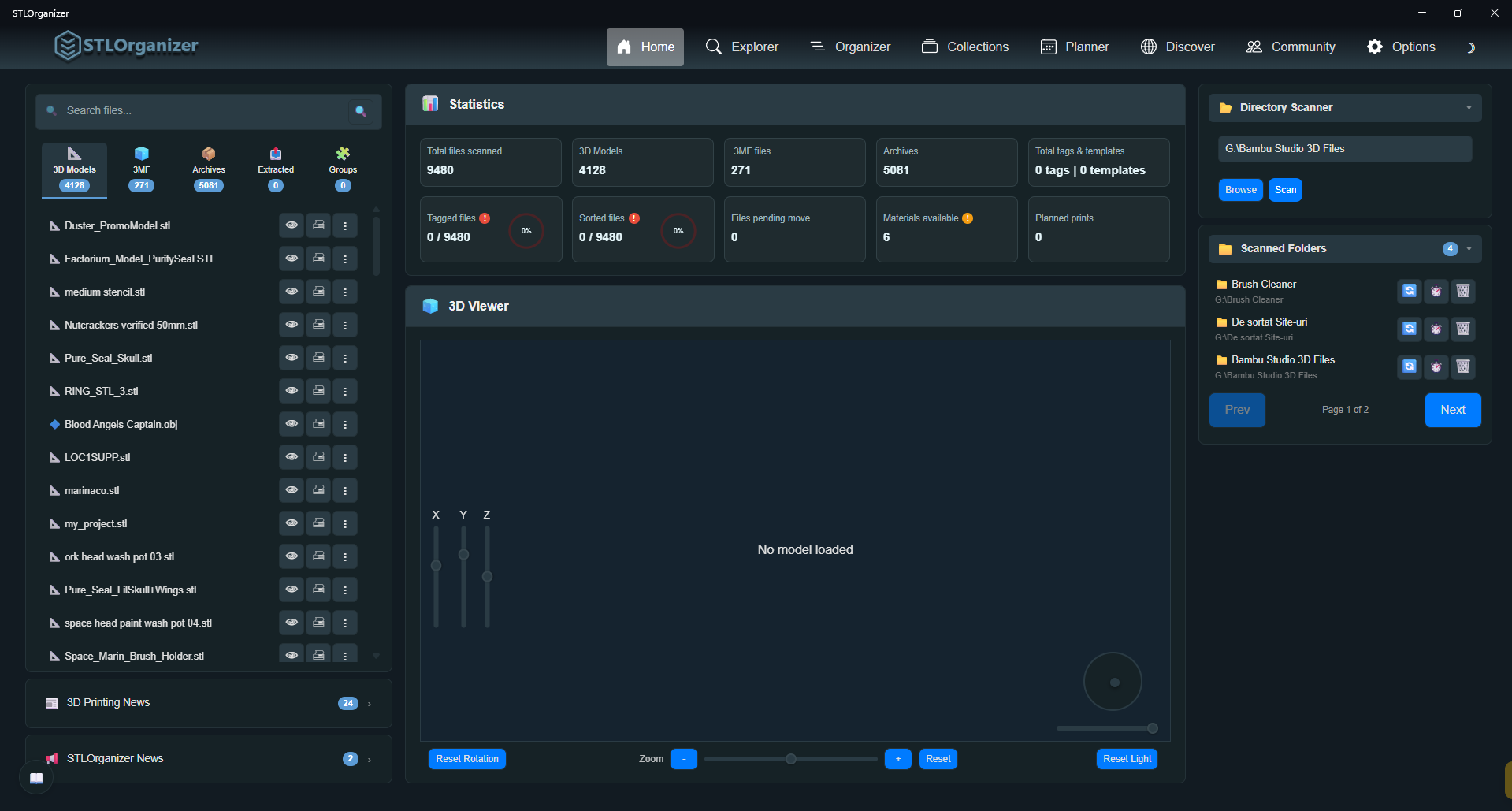
Scan once. Every model gets a 3D preview, duplicate detection, and metadata you can search by tag, license, material, or note.
├─ ▲ household/ — 412 models
├─ ▲ tabletop/ — 1,204 models
├─ ▲ gifts/ — 88 models
├─ ▲ cosplay/ — 156 models
├─ ⌕ search by tag · license · author
└─ ⊘ 262 duplicates flagged
A workspace built for the way you actually print.
Four core surfaces, each tuned to the part of your workflow it owns. No bloat, no AI gimmicks — just the tools you keep wishing your slicer had.
Tag, group, and move thousands of files in minutes.
Switch between Current Folder, Unsorted, and Pending Move tabs to triage your library. Build path templates from your own tags and apply them to hundreds of files at once. STLOrganizer plans the move and shows you exactly where every file will land before you commit.
- Multi-select with checkboxes — operate on hundreds of STLs at once
- Visual template builder for path structures you reuse
- Per-file metadata: author, license, collection, notes
- Built-in Find Duplicates across your entire library
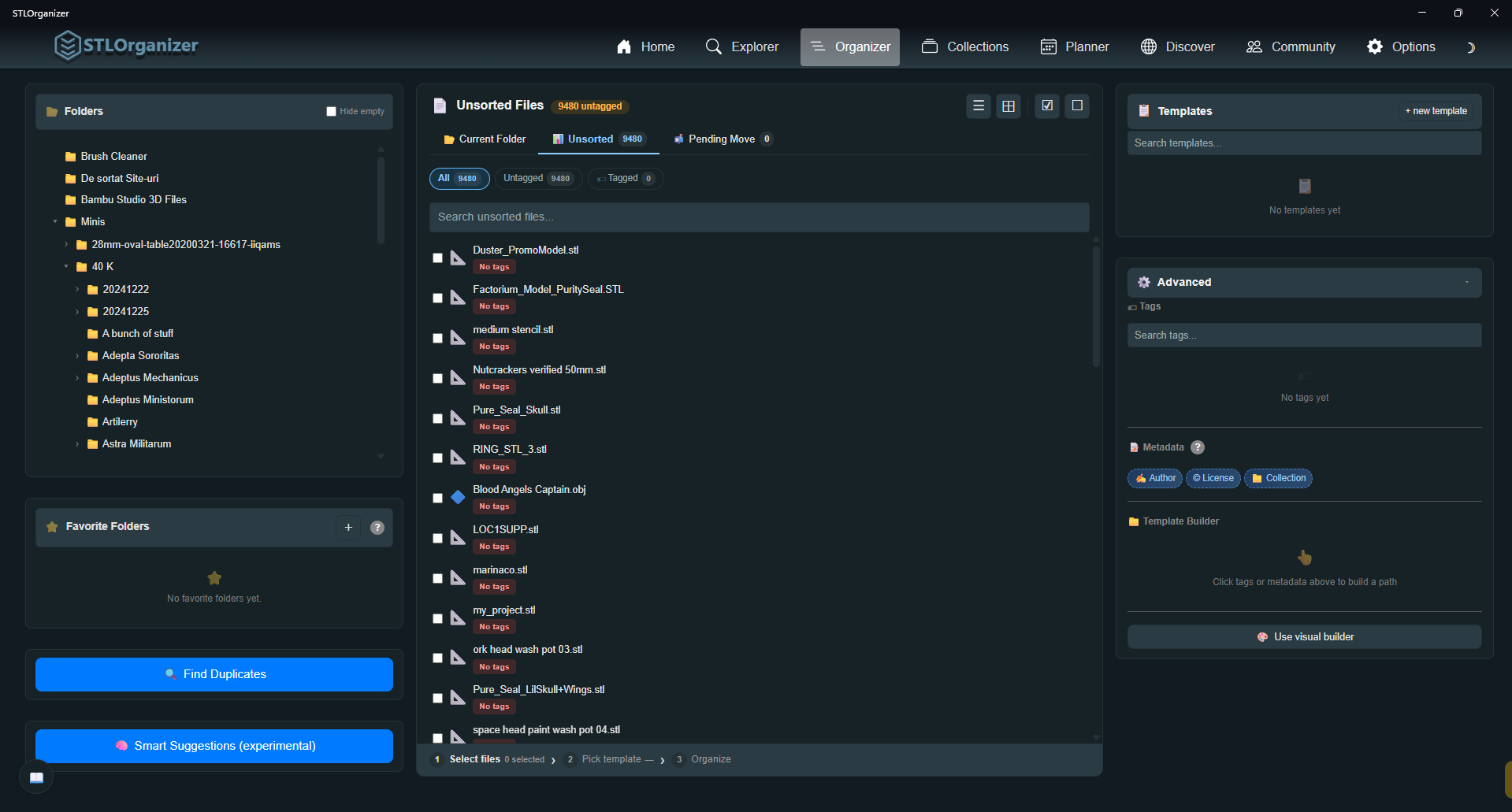
A node editor for folder structures — with logic.
Drag tags, metadata fields, and conditional logic onto a canvas to design exactly how your library should be laid out. Branch on author, license, material, or category with If/Else nodes — the kind of structure spreadsheets and rigid "smart folders" can't express.
- Drag-and-drop nodes: tags, metadata, custom folders, conditions
- If/Else branching on any metadata field — author, license, material
- Live path preview before you commit a single move
- Save templates and reuse them across folders & libraries
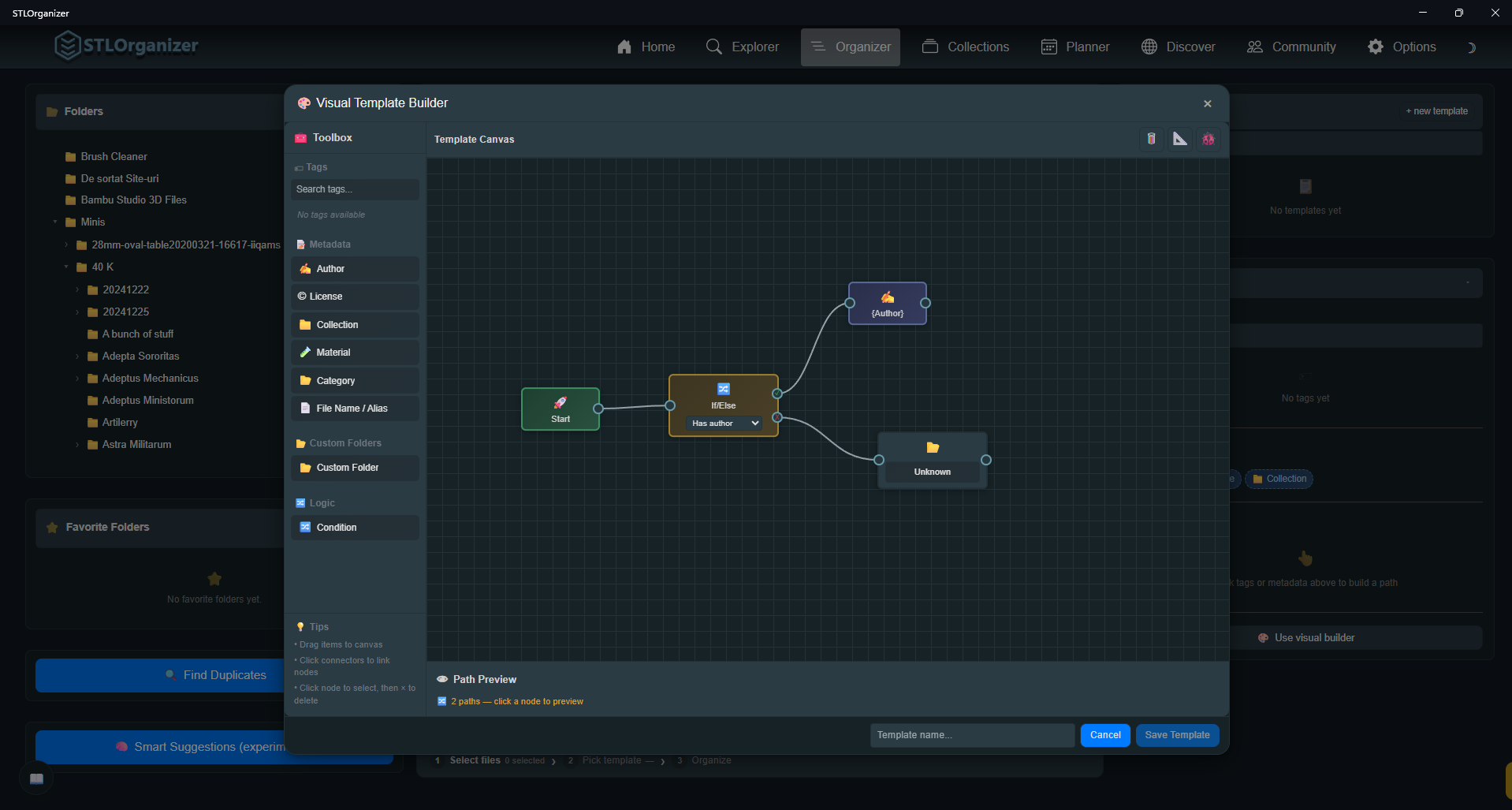
Preview any STL in 3D — no extra software.
Spin, zoom, and light up the model right inside the app. Capture a thumbnail to use as your file's cover, then fill in metadata the way you actually want: author, download link, license, material cost, miniature flag, notes.
- Hardware-accelerated 3D viewer with rotation, zoom, lighting
- Capture thumbnails to identify files at a glance
- Track commercial licensing per file — never get burned
- Material cost, polygon count, and modified date at a glance
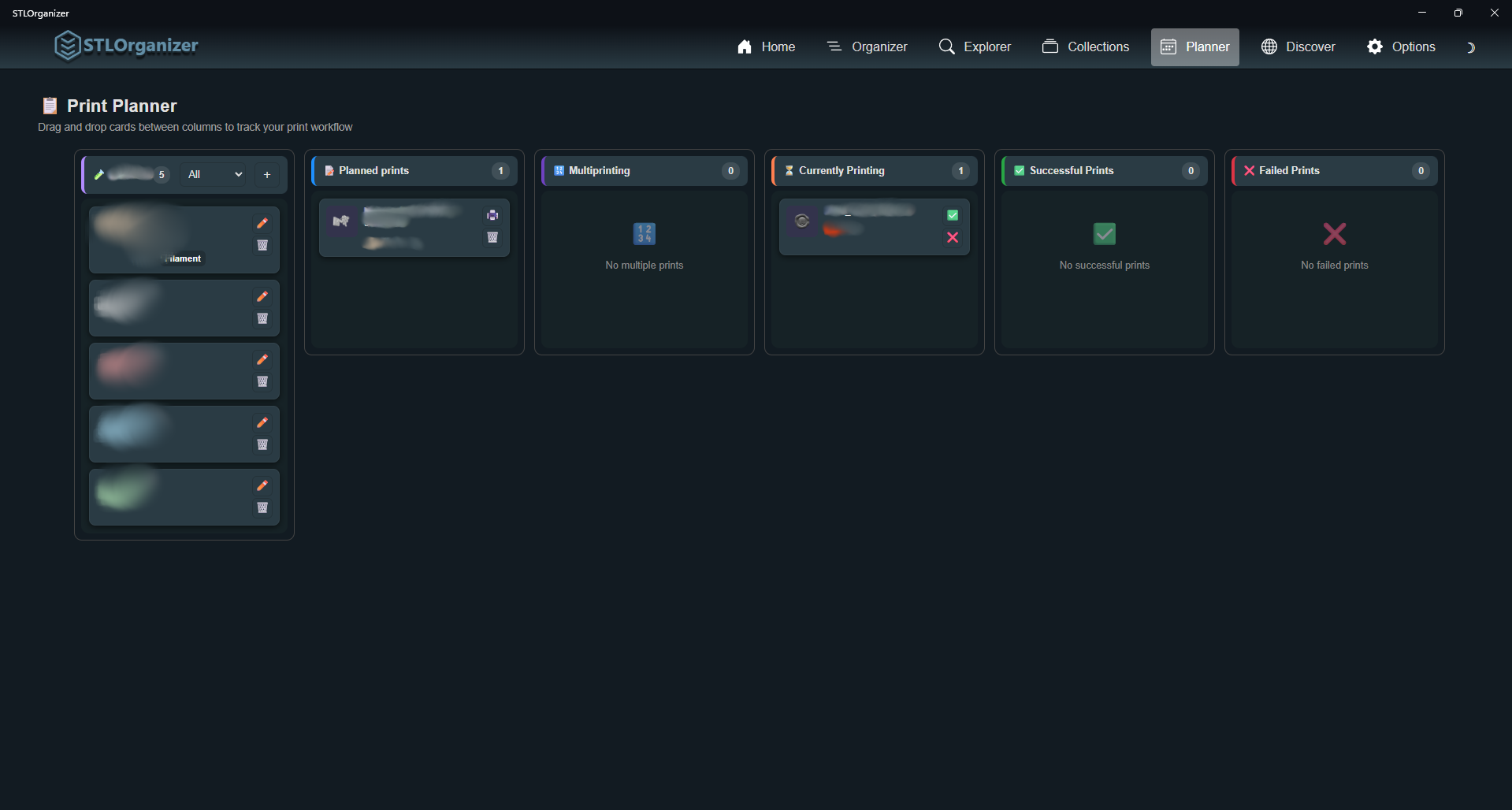
A kanban board for your print queue.
Drag prints across Planned, Multiprinting, Currently Printing, and Successful or Failed. Track filament use, batch by spool, and finally know what you printed last weekend.
- Drag-and-drop columns for every stage of the print
- Filament spools tracked with weight, color, and material
- Batch multi-prints onto a single plate, track them together
- Success / failure history per model and per spool
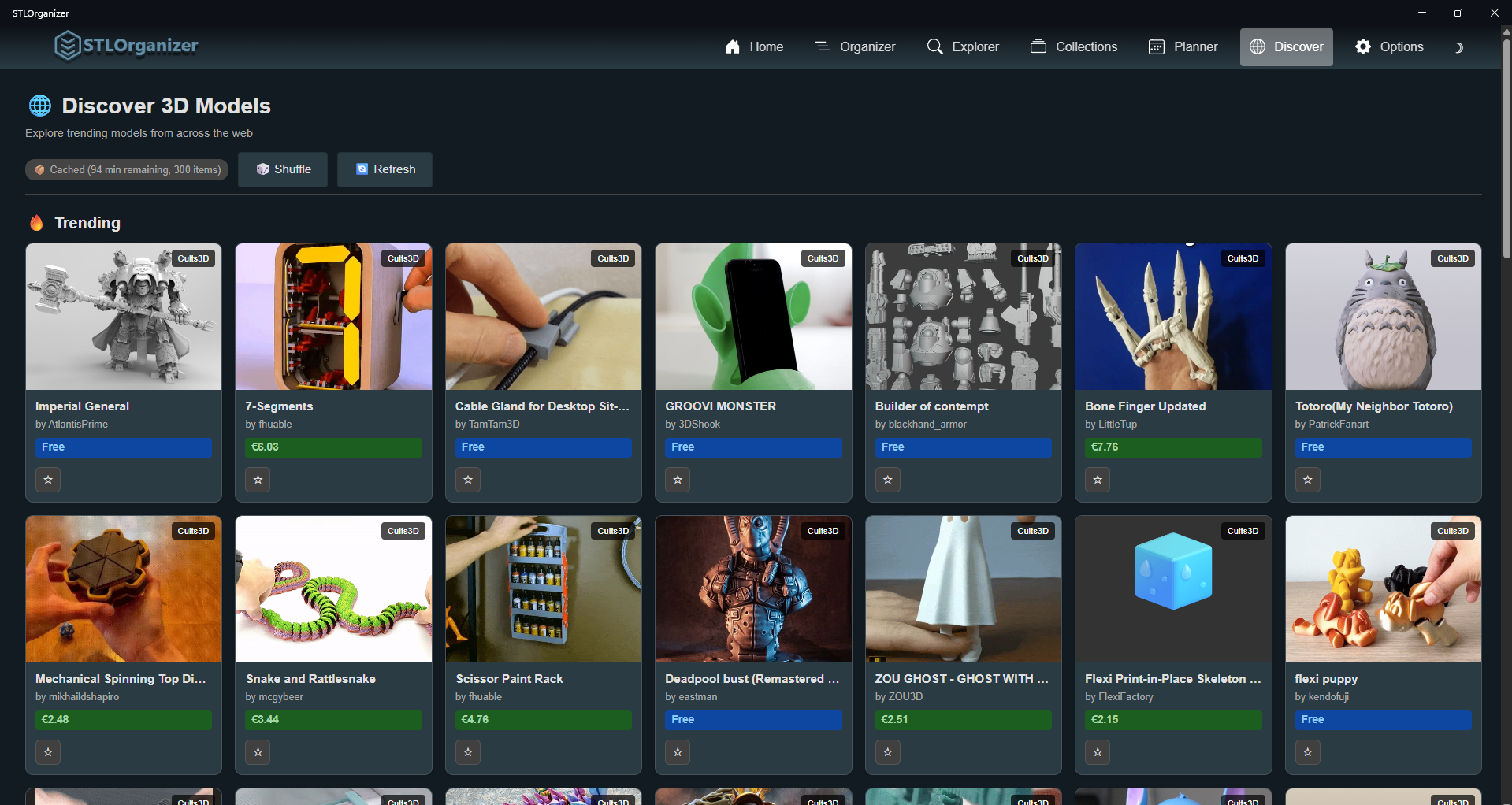
Find what to print next — without leaving the app.
Browse trending models from Cults3D right inside STLOrganizer. Star what you like, get smart recommendations based on the tags you've already used, and queue downloads straight into your organized library.
- Cults3D trending feed with author, price, and license
- Personalized picks driven by your tag history
- Favorites stay synced with your library metadata
- More sources rolling in — Printables & MakerWorld next
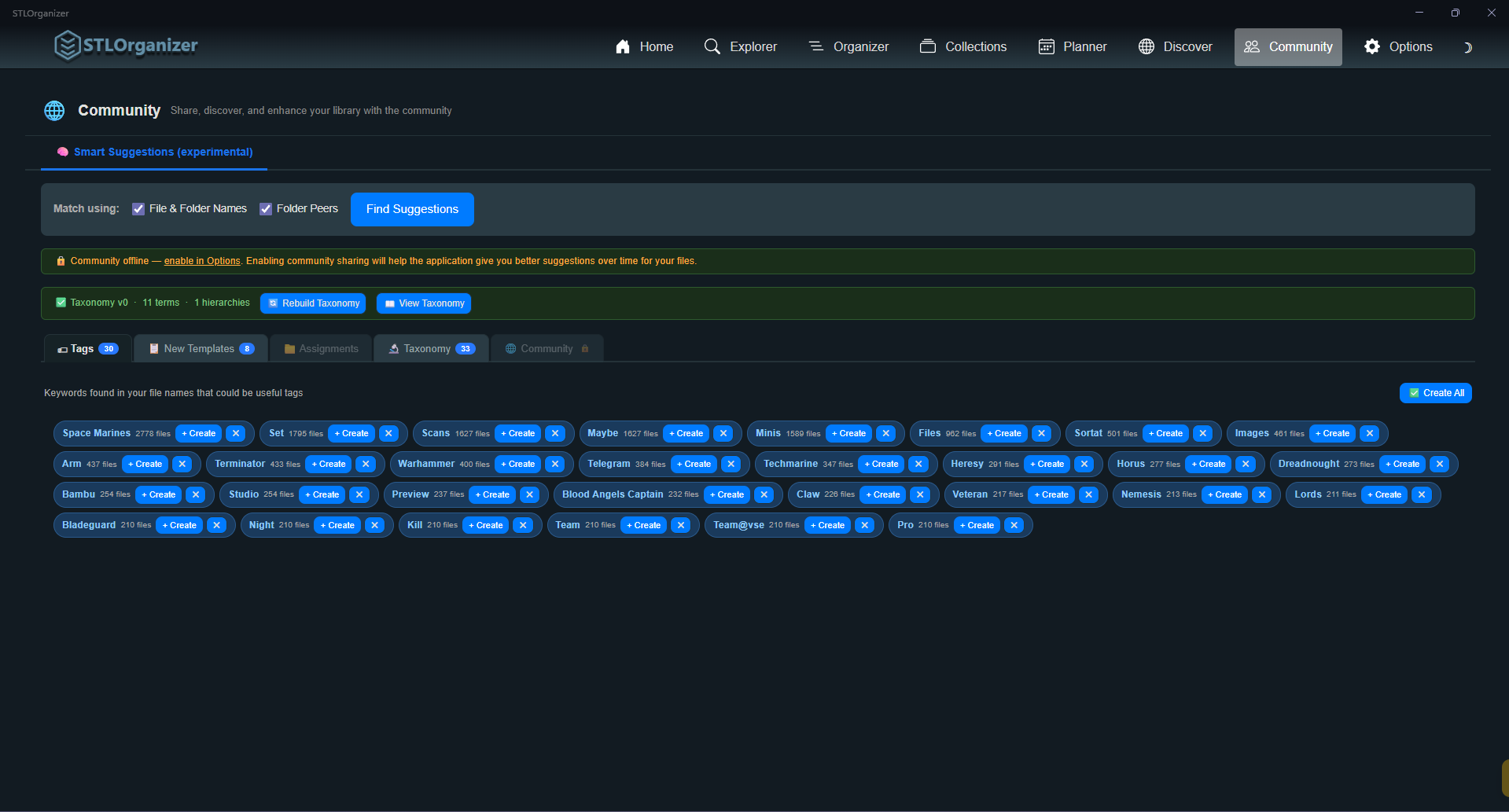
Smart tag suggestions — powered by the community, opt-in always.
Turn the Community feed on and STLOrganizer mines patterns from your file and folder names to suggest tags that have actually worked for other makers. Off by default. Every tag and template has a Private toggle. Your collections, files and metadata never leave your machine.
- Smart Suggestions mines your filenames for tags worth creating
- Publish tags & path templates — or keep them private
- Collections, files & metadata stay 100% local — always
- Fully opt-in — Community is off by default, never required
Built for makers who take their library seriously.
The details that turn a viewer into a workshop. Everything ships with the first Windows release.
STL · 3MF · OBJ · Archives
Scans nested folders and auto-extracts STLs from ZIP, RAR, and .3mf bundles when you preview them — no manual unzipping.
Search across everything
Filename, tag, metadata, notes, author. Search reaches inside archives too — including STLs the app hasn't auto-extracted yet.
100% local-first
Your library, settings, and metadata live on your machine. No account, no cloud, no telemetry that leaves the device.
Node-based template builder
Compose folder paths visually with a real node editor — drag tags, metadata, and If/Else conditions to design the structure your library will follow.
Dedupe with confidence
Hash-based comparison finds true duplicates across folders — even if they have different names or live in different archives.
One-click to your slicer
Open any STL directly in Bambu Studio, PrusaSlicer, OrcaSlicer, or Cura. Configure your default once and forget about it.
Built by a guy who got tired of guessing.
"I'd download a model on a Tuesday and spend forty minutes Wednesday night trying to find it again. STLOrganizer is the tool I needed for myself — local, fast, and honest about what it does. If you've ever lost a print to a folder named things-old/, this is for you."George-Adrian Balas — Maker, developer & creator of STLOrganizer
Shipped, shipping, and what's next.
We ship the Windows core first, then expand sources and platforms. The list below is the actual plan — not aspirational fluff.
Core organizer
Folder scan, 3D preview, tag templates, find duplicates, metadata editor, planner board.
Windows public release
Free Windows installer with the full app — scan, preview, tag, plan, and discover, all in one place.
More modules for STLVerse
Expanded modules for STLVerse will be coming in the future with inter-app communications through the STLVerse hub application.
Other platforms
macOS and Linux are on our minds but not yet promised — we'll only announce a build when we're confident we can ship it well.
Questions makers actually ask.
Is STLOrganizer free?
Does my data ever leave my computer?
What file types are supported?
Will it work with my slicer?
What about Mac or Linux?
What's the "Smart Suggestions" thing about?
Do I have to share anything with the Community?
Can I move folders around outside the app?
The Windows demo is out now — take back your library.
Free to download, free to use. Turn that folder chaos into an organized, searchable workshop today.
Download for WindowsGet release notes and major updates by email. No spam, ever — unsubscribe in one click.
Join the community.
Follow us for updates, sneak peeks, and to share your prints with fellow makers.